

EVERY FEATURE, SPELLED OUT
Know your market. Run your outreach.
Keep the whole picture in view.
For hospitals, nursing homes, home health agencies, hospice agencies, personal care homes and other healthcare organizations seeking more referrals, CareMetric Intel connects market intelligence, a healthcare marketing CRM, field work, and referral reporting. Explore every feature below, including the roles and plans that can use it.
30 days free · No credit card needed to start · Pro features in one county
Search by task, feature, or plan. Or browse every area below.
Features without a label are available to every role on every plan, within the plan’s territory and service-line allowance. Labels name additional role or plan requirements. The 30-day trial includes Pro features in one county, with your choice of healthcare service lines.
Healthcare marketing CRM
The marketing book: the accounts you keep month to month, the people you know there, and everything your team has logged on them.
Marketing book of accounts
Keep hospitals, nursing homes, personal care and assisted living homes, physician practices, agencies and other referral sources in one book. Each account holds its type, city, phone, website, NPI, CCN, tags and owner.
Lines of business
Organize relationships by healthcare service line, including practices, hospitals, behavioral health, rehabilitation, diagnostics, senior care, home health, hospice, DME, and other healthcare services. One account can have a separate stage and history on each line.
Starter: one line
Relationship stages
Move accounts through Target, Relationship, Active source, Preferred, At risk and Lost. The date of the last change is kept, and At risk or Lost asks why: competitor, service issue, staff turnover, moved or other.
Contacts by healthcare role
Record the administrator, director of nursing, business office, social services, admissions, discharge planner, case manager, physician liaison, physician, intake, MDS coordinator and executive director. Mark someone as left to keep their history and stop email to them.
Account page and full history
Notes, the next visit or call, referrals, expenses and campaigns on one page. Search the account’s whole activity history by note, employee or date. Print a one-page account sheet without notes.
Market position on every account
An account with a CCN or NPI shows its lead score, county and state share and rank, Medicare beneficiaries, star ratings, staffing, cost-report figures and discharge mix beside your own relationship history.
Month end view
Sales calls, referrals, admissions, calls per referral and a six-month trend. See which accounts are referring more or less, which you called with no referral, and which belong on next month’s schedule.
Search, filters and saved views
Search by name, city, tag, NPI or CCN. Filter by type, stage and data-quality flags, save a view as your default, share it by link, and change the stage of many accounts at once.
Spreadsheet import and export
Import up to 2,000 accounts and contacts from a CSV with column mapping and a preview, from a template if you want one. Matches fill blanks instead of creating copies. Export the book or the rows you tick.
Book hygiene
Possible duplicates are listed for a one-step merge. Chips flag accounts with no phone, no contact, no email, an invalid email or no call in 90 days, and engagement reads Healthy, Warm, Cold or No activity.
Going quiet
Accounts whose referrals dropped, or that have gone 45 days without a visit, are listed with the reason and marked on the book and in the Monday digest.
Compare accounts side by side
Compare two to four accounts on stage, contacts, visits, referrals and admissions, star ratings, Medicare share and recent activity. Save the comparison, print it or download a PDF.
Claim, release and hand off
Claim accounts for your own book. When someone leaves or changes territory, move their whole book to a teammate in one step. Visits and referrals already logged stay credited to the person who logged them.
Hand-off: owners & location managers
Parent organizations
Group locations that belong to the same organization, from a shared parent name, practice name or people, or name the parent yourself.
Physician group certifications
Open a physician group in the market list to see which members certify home health or oversee hospice care, the patients Medicare published for each, who is on your book, what your book admitted from them in 12 months and an estimated share. Members CMS doesn’t list show as not listed, never zero, and high-volume members not on your book go to a lead list in one step.
Account tiers and visit cadence
Mark accounts tier A, B or C, or let Intel suggest tiers from each account's referrals. The organization sets how often each tier should be visited; Today and Team review show who is behind, the suggested route moves them up, and Monday's email lists them.
Call or text from an account
Call and Text open the phone's dialer or messages app from the account or a person there, then log the call (or a note for a text) in one tap. Nothing is placed or sent from Intel.
Daily field work
The day on the road: what to do today, where to go, and a fast way to record each visit from a phone.
Today
Your workspace when you sign in: tasks with due dates and priorities (overdue ones stay marked), progress on this month’s goals, and up to ten accounts to visit this week, each with one reason.
Tasks and assignments
Create tasks for yourself, linked to an account or not. A manager can assign a task to a named teammate.
Schedule and call plan
Plan visits and calls by day on a weekly agenda. Reschedule or remove a pending activity, or complete it with an outcome so the plan note is kept and the visit is not logged twice.
Suggested route
Builds a day from open service issues (first, even when you are closed to new referrals), follow-ups that are due, sources whose referrals fell, contacts who left and key accounts with no visit in 45 days. Among them, the accounts whose referrals you admitted rank higher, and each stop says why it is there. The stops are ordered as a route on a map. Order this week’s scheduled visits by drive time too.
Visit log built for a phone
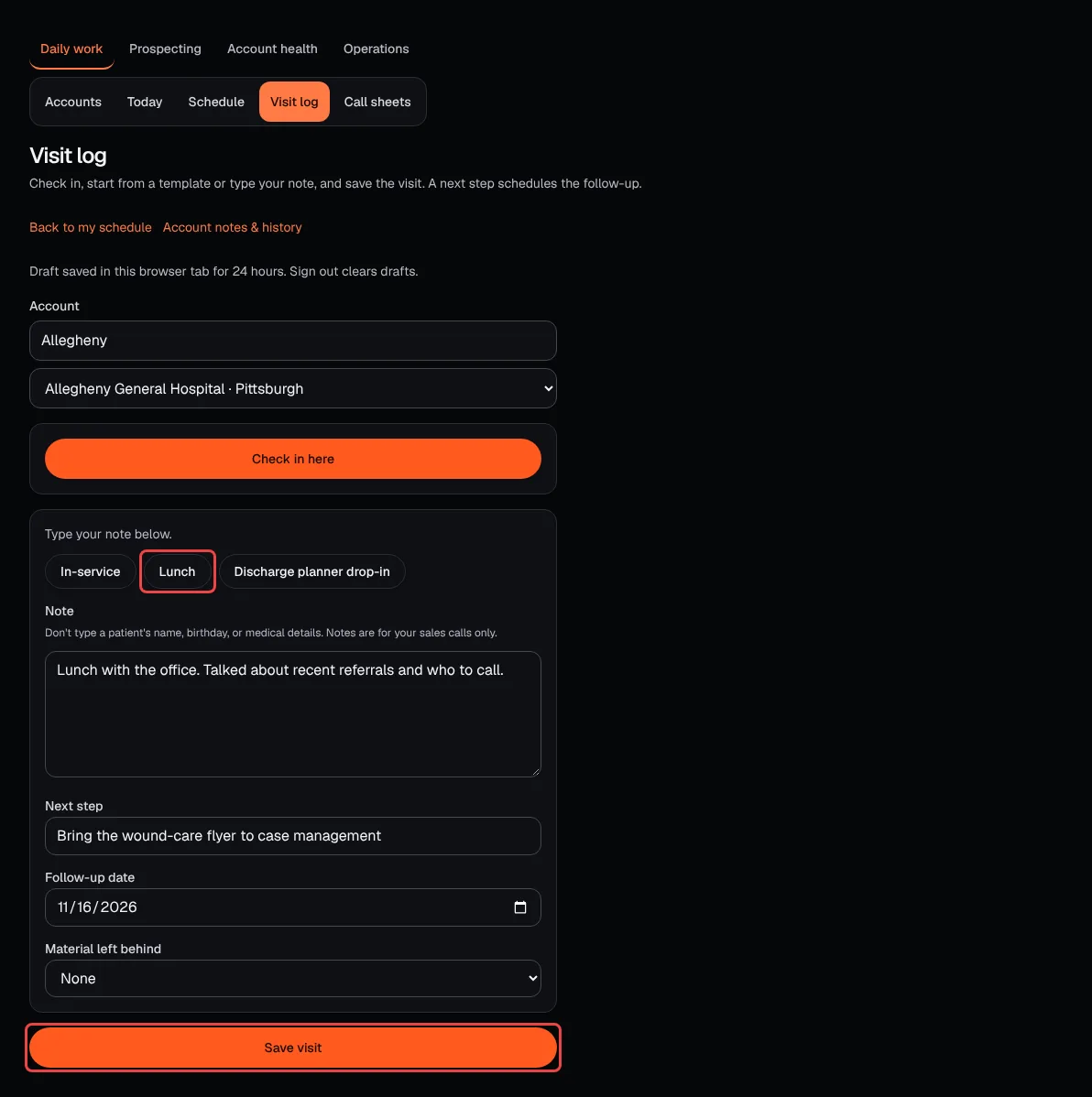
Check in with the phone’s location, type or dictate the note, and start from an in-service, lunch or discharge-planner drop-in template. A next step with a date schedules the follow-up. A draft survives a refresh and a save can be retried without duplicates.
Pre-visit card
Before you walk in: the last visit and notes, referrals for 90 days against the 90 before, the oldest open referral, open tasks, the people on the account and what you left last time, with up to four talking points chosen from those figures. On a plan with AI briefs, an AI summary of your last notes.
Spoken visit debrief
Say or type what happened after a visit and the AI proposes the visit note, the next step and its date. It also suggests a stage for the account when your referrals or the visit call for one, such as Active source after referrals or At risk when the relationship cooled, and the stage changes only if you move it. Nothing is saved until you check the form and save the visit. Possible patient details are taken out before the AI reads anything. Each debrief, notes summary or paid voice note uses one of your organization’s daily AI requests (500 a day on Growth, 2,000 on Pro), and the Visit log shows how many are left.
Growth & Pro
Business card scan
Photograph a business card on an account and the phone reads the name, role, phone and email for you to check before the contact is saved. On Growth and Pro a paid reader takes over when the phone finds no name, using one AI request.
County call sheets
A working list for a county: hospitals, home health agencies, hospices, nursing homes, clinicians, DME suppliers, personal care and assisted living homes and dialysis facilities. Mark each Call, Visit or Account and it lands on the marketing book. Print the schedule or the chart of accounts.
Follow-up emails
Send one email to a contact and book a dated visit in one step. Members schedule the visit and an owner sends the email; every email carries an unsubscribe link and your postal address.
Calendar sync
Download your scheduled visits and calls, subscribe with a private calendar link, or sync them to Outlook or Google Calendar. Notes are never copied to the calendar.
Outlook and Google sync: where configured
Weekly book digest
A Monday email for each marketer: last week’s visits, the coming week’s follow-ups, referral changes on their accounts, accounts going quiet, overdue tasks, new or moved physicians and sources falling off pace.
On your phone’s home screen
Add CareMetric Intel to a phone’s home screen and it opens like an app.
Hands-free on the road
Have the phone read the pre-visit card aloud (never your notes), ask the AI Assistant by voice where it is open, and open directions to the account in Google Maps, Apple Maps or Waze.
Expenses, mileage and reimbursement
Expense reports built for healthcare marketing: spend is logged against the referral source it was for, valued per person, checked against the Stark limit and your policy, approved, and paid.
Expenses logged by account
Record the account, date, amount, business purpose and payment method (corporate card, personal card, out-of-pocket cash, company check). Categories cover meals, gifts, entertainment, education and in-services, promotional items, mileage, per diem and events. Cash and gift cards are deliberately not offered.
Receipt capture
Take a photo or upload an image or PDF and it attaches when you save. Where receipt reading is configured, the amount, date, vendor and a suggested category and account are read from it for you to check.
Per-person value for shared meals
List everyone who partook and the expense is split among them, the valuation rule CMS sets for shared benefits (42 CFR 403.904(g)(1)). Each person’s value builds up across the year.
Stark annual limit tracking
Each physician’s running total is measured against the Stark nonmonetary-compensation limit for the year (42 CFR 411.357(k)), with a warning as it gets close. The limit itself blocks approval unless a manager overrides it with a logged comment.
Non-physician policy totals
Spend on discharge planners, case managers and other referral sources builds up against an internal policy alert you set. It is an alert, not a legal safe harbor: the Anti-Kickback Statute names no dollar threshold.
Policy checks and flags
Per-meal caps by meal (breakfast, in-service lunch, out-of-office lunch, dinner), a per-diem cap, meals per person per month and per 12 months, large single benefits, entertainment, missing receipts, documentation gaps and possible duplicates are all flagged.
Approval workflow
Save a draft, then submit. Clean, fully documented expenses under your approval threshold approve themselves; flagged ones wait in a manager’s queue to be approved or denied with a note. A denied expense can be corrected and resubmitted.
Approving: owners & location managers
Reimbursement tracking
Approved and paid are separate facts. A manager records the paid date, method (payroll, direct deposit, check) and batch, one expense or a whole batch at a time. Marketers cannot mark their own expenses reimbursed.
Owners & location managers
Budgets and compliance settings
Set a monthly budget per marketer, the approval and receipt-required thresholds, meal and per-diem caps, frequency limits, the warning percentage, the mileage rate and the non-physician policy total.
Owners & location managers
Who you’ve spent on
Every marketer sees each person they have spent on this year, their running value against the limit, and their meal counts. The same totals appear on each account’s page.
Expense reports and exports
An itemized register, totals by marketer and by account, a compliance report and a payroll / AP export, for any date range, marketer, category or status. Download CSV or PDF.
Owners & location managers
Scheduled expense reports
Email any expense report daily, weekly or monthly to the managers you choose. Send a test, pause or edit a schedule at any time.
Owners & location managers
Mileage log
Adds the straight-line miles between each day’s visit check-ins and prices them at your organization’s mileage rate. Turn a day into a mileage expense draft in one step, then submit it like any other expense. Download the log as CSV.
Referral and admission tracking
Your organization’s own results: the referrals each source sends, what became of them, and which relationships are slipping.
Log referrals and outcomes
Record a referral on the account it came from, with the service, payer and a note. Mark it admitted or not admitted, with the reason, when you know.
Response time
Each referral keeps the time it came in, when it was first answered and when it was decided. Results reports median hours to first answer and to decision, the share answered within an hour, after-hours arrivals and the slowest sources.
EMR report imports
Import referrals and admissions from CSV reports with column mapping and a preview. Saved layouts cover HCHB, WellSky, Axxess and MatrixCare. Upload a file, pick one up from an SFTP drop folder, or forward it to an email-in address. Patient-identifying columns are dropped and never stored.
Owners
Scheduled MatrixCare delivery
MatrixCare reports can be delivered on a schedule your organization controls, with a delivery health page that shows the interval, observed dates and source totals. A file with rejected rows is held instead of imported.
Owners
Referral funnel
Referrals received, admitted and not admitted, and why, by account and by marketer.
Referral drop-off alerts
Flags a top source when its last 30 days fall at least 30% below its average month from the 90 days before. An owner can set the drop anywhere from 10% to 90%.
Outcomes packet
A one-page quarterly PDF for a hospital or facility: the referrals they sent, how many were admitted and how fast they were answered, your organization’s CMS star rating, readmissions and quality scores, and the availability you confirmed. Hospitals in CMS’s TEAM model are flagged, with a list of TEAM hospitals to target. Make a live link the hospital can open any time: the quarter to date, rebuilt each time it is opened, counted, and turned off when you choose. No patient names, notes or clinical detail.
Lost reasons
Totals the reasons behind every lost and at-risk account, shows how many have no reason recorded, and lists the accounts.
Admissions forecast
Estimates how many open referrals will be admitted, from your last 180 days, as a range that stays wide when the history is short.
Pro
Availability
A dated confirmation of what your organization can take: accepting, limited or closed to new referrals, confirmed openings, earliest start, counties, disciplines, payers, languages and weekend coverage. Expired confirmations read as unconfirmed.
Confirming: owners & location managers
Why a source is slipping
For a source on the drop-off list, see what the book shows over the same months: a contact who left, referrals not admitted, availability you gave, fewer visits, a service ticket, slower responses, a physician who moved and a watched competitor nearby. Add the next step as a task in one tap.
Shareable profile link
A revocable page for referral sources, by location: intake phone and fax, services, current confirmed availability, CMS ratings and the median first response to referrals, with a QR code and a view count. No patient information.
Prospecting and targeting
Find the physicians, practices and facilities worth a relationship, with a reason behind each name on the list.
Provider and facility directory
Search providers, organizations, practice locations and facilities by name, NPI, specialty and place. Profiles show locations, taxonomies, affiliations and available Medicare activity.
Target Builder
Filter providers by state, city, ZIP, specialty, score range, Medicare patient volume, Medicare participation and behavioral-health or geriatric focus, then save the matches as a list.
Saved lead lists
Work a list with a status for each provider (New, Contacted, Qualified, Not a fit), add to it from any provider page or search, and export it.
Referral-source rankings
Rank a county’s clinicians by a referral index built on Medicare data, including the patients they certified for home health, and add the top names to a list in one step.
New physicians
Physicians newly listed in your area in the last 45 days, and people already on your book whose practice address or facility changed.
New referral sources
For a home health agency, a hospice, a nursing home, a personal care home or a hospital: the hospitals, nursing homes, agencies, personal care and assisted living homes and clinicians that refer to an organization like yours, ranked by reported volume, with which are already accounts and what each referred. Add a source to accounts in one click. Home health and hospice also get under-worked hospitals and physicians, hospice planning estimates, and counties with high need and little local supply.
Physician share
Your admissions from each physician divided by the home health certifications or hospice care-plan oversight Medicare published for them, banded as mostly yours, split, rarely yours or none yet, with the Medicare dollars behind each physician’s patients and the part you didn’t admit. Labeled estimates from CMS counts and county Medicare payments.
Opportunity scores
Providers in the scored states carry a lead score from CareMetric’s scoring rules, and the provider’s page shows what went into it. A provider without one reads Unscored; a score is never invented.
Market and territory research
The people, providers and Medicare activity in the places you serve, within your plan’s territory.
Territory map
Providers on a map of a state in your territory, highest lead scores first. Filter by specialty group, entity type, score range and patient volume, color by score, or switch on a heat map. A county-density tab ranks counties by practice locations.
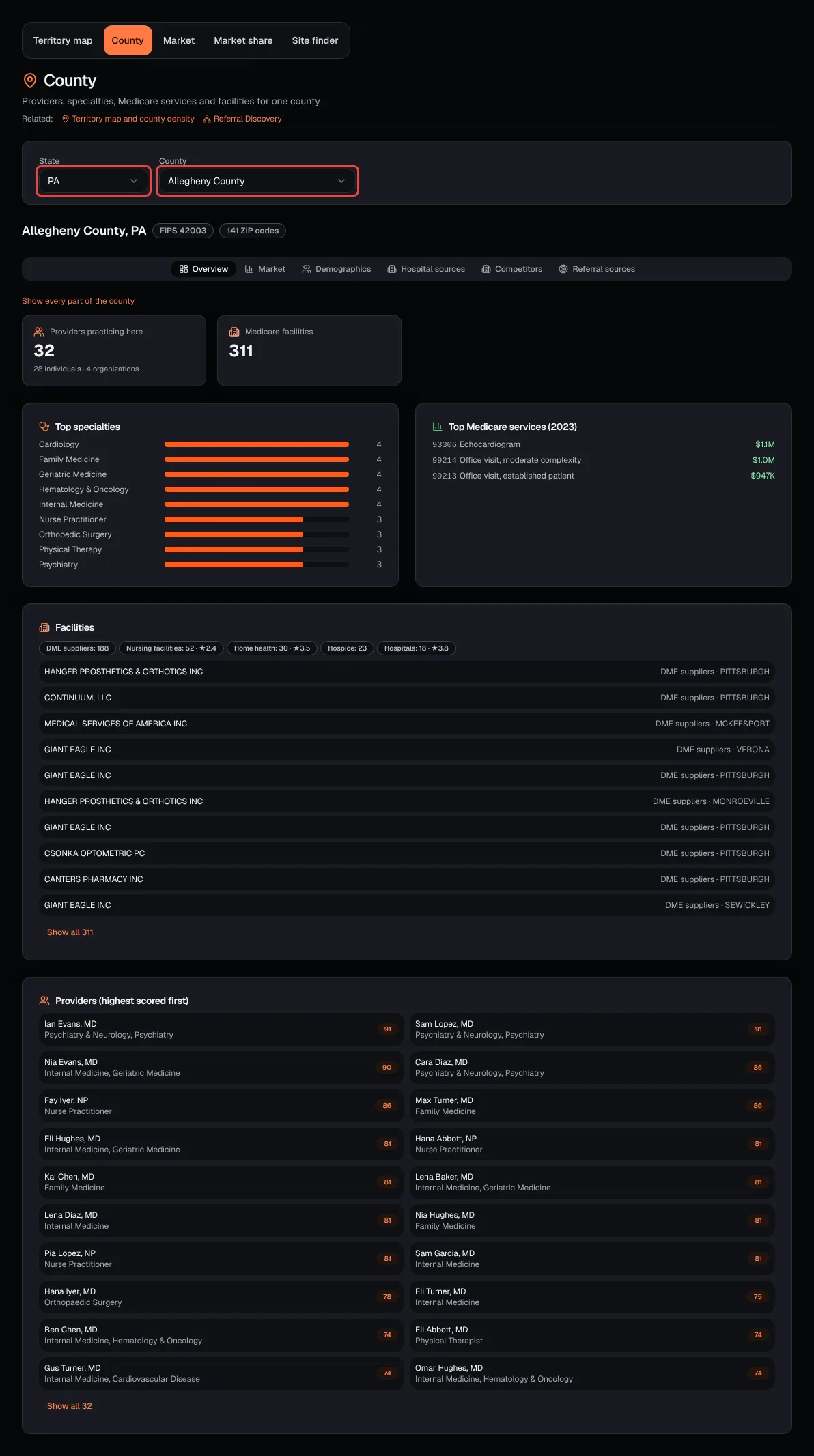
County intelligence
A county’s older-adult population, income and adults living alone; the hospitals its residents use and where their post-discharge spending goes; current Medicare facility listings with published-county or labeled ZIP-based membership; historical post-acute providers assigned by their reported ZIP; and top referral sources.
Demographics by county and ZIP area
Residents 65+, 75+ and 85+, median age, household income and home value, poverty, uninsured, disability, Medicare-Medicaid dual coverage and 65+ households living alone, for a county and each of its ZIP areas, with the change in residents since 2020.
Community and payer context
On each county: Medicare Advantage plans, penetration, star ratings and supplemental benefits, Medicaid managed care where CMS publishes it, chronic disease prevalence, social vulnerability, shortage areas, healthcare wages, Part D prescribing and the most common Medicare services.
Site finder
Rank a state’s counties, or the ZIP areas of a state or county, for a new office or facility. Pick a service line and compare demand, growth since 2020, need and the supply gap; the opportunity index averages each area’s percentile among the areas compared. Download it as CSV.
Market data and market share
Each county’s Medicare enrollment and Medicare Advantage share, home health, hospice and skilled nursing use and supply, spending and readmissions, and agency shares using the displayed service-area or provider-ZIP method. Historical post-acute county assignments use the provider ZIP from the utilization year and the Census county containing most of that ZIP area; they can differ from current directory office counties.
Facility directory
Hospitals, home health agencies, hospices, nursing homes, inpatient rehab, long-term care hospitals, DME suppliers, community health centers, dialysis facilities, and state-licensed personal care and assisted living homes where loaded. Export DME suppliers to CSV or Excel from the DME report.
Facility profiles
Ownership, cost-report revenue and expenses, beds and visits, star ratings and quality measures, service areas and rank in the county and state. Print a branded profile.
CMS quality scores
A hospice's Hospice Care Index and its Service and Spending Variation Index from CMS's FY2027 hospice rule, a home health agency's value-based purchasing score and payment adjustment, and whether a hospital is in CMS's TEAM model, on each facility page.
Utilization and CMS data
Medicare payments and service volume by specialty, and any clinician’s Medicare service lines by NPI.
Market briefs
Ready-made briefs for expansion (where to grow), acquisition (the largest operators in a state), hospital relationships and referral development.
Data freshness
Every market view shows which release it uses and when it was loaded, so you can judge the figures before using them.
Healthcare data library
More than 150 healthcare datasets from CMS, NPPES, the U.S. Census Bureau, HRSA, CDC, AHRQ, BLS, the HHS Office of Inspector General and state licensing agencies, linked by NPI, CCN, county and ZIP.
Providers and clinicians
Every individual and organization in the national NPI registry, with practice locations, NUCC specialties and affiliations, kept current from CMS’s weekly files. Add Medicare services and payments by clinician, home health certifications, hospice care-plan oversight, Order & Referring enrollment, Part D prescribing and MIPS scores.
Facilities, quality and ownership
Provider of Services and Care Compare files for hospitals, home health agencies, hospices, nursing homes, inpatient rehab and long-term care hospitals: star ratings, patient surveys, readmissions, inspections, penalties, nurse staffing, ownership and chains, plus cost reports for hospitals, home health agencies, hospices and nursing homes.
Medicare use and market activity
Home health, hospice and skilled nursing use and supply by county, post-acute utilization by provider, spending and readmissions by county, Hospital Service Areas, inpatient diagnosis groups and outpatient services, DME by supplier and referring provider, and monthly Medicare enrollment.
Demographics and growth
American Community Survey 5-year estimates for every county and ZIP area (ages 65+, 75+ and 85+, median age, income, home value, poverty, uninsured, disability, living alone and dual coverage) and Census population estimates of the change since April 2020.
Payers and Medicare Advantage
Medicare Advantage enrollment by organization, contract and county, penetration, plan star ratings and supplemental benefits; Medicaid managed care plans where CMS publishes them; and marketplace insurers by county.
Community health and need
CDC PLACES disease and disability prevalence, the CDC Social Vulnerability Index, AHRQ social determinants of health, HRSA shortage and medically underserved areas, the HRSA Area Health Resources File, Mapping Medicare Disparities, BLS healthcare wages, County Business Patterns and VA facilities.
Provider standing and payments
A provider’s page flags an OIG exclusion, a Medicare opt-out or revocation and the next revalidation date, and shows Open Payments totals from drug and device makers, so you can check standing before you invest in a relationship.
State-licensed homes
Personal care, assisted living, memory care and domiciliary care homes and their beds, imported from each state’s licensing file and counted in county and ZIP area figures. In a state whose file is loaded, an area with none reads 0.
Releases checked daily
The CMS catalogs are checked every day for new releases, and stored rows are refreshed when one arrives. Data years more than ten years old are removed, and a dataset its publisher stopped releasing is retired instead of shown as current.
Competitor intelligence
Who you compete with for referrals, how they are moving, and what to say about it.
Competitor rankings
Hospitals ranked by their share of each county’s residents’ Medicare inpatient cases, and nursing homes, home health agencies and hospices in your territory ranked by Medicare share, each with its star rating and change. Yours is marked. Download the rankings as CSV.
Watchlist and alerts
Follow the agencies, nursing homes and hospitals that matter and get alerts when a star rating, owner or service area changes, a change of ownership is filed, or a new agency or nursing home opens nearby.
Compare and trends
Put competitors side by side on market rank, volume, share and its change, star rating, locations and ZIP codes served, and follow their share over time.
County roll-up
Every county in a state with its market leader, number of providers and biggest mover, as CSV or a leadership-brief PDF.
Scheduled leadership brief
Email the county roll-up as a PDF to your managers daily, weekly or monthly.
Owners & location managers
What to say
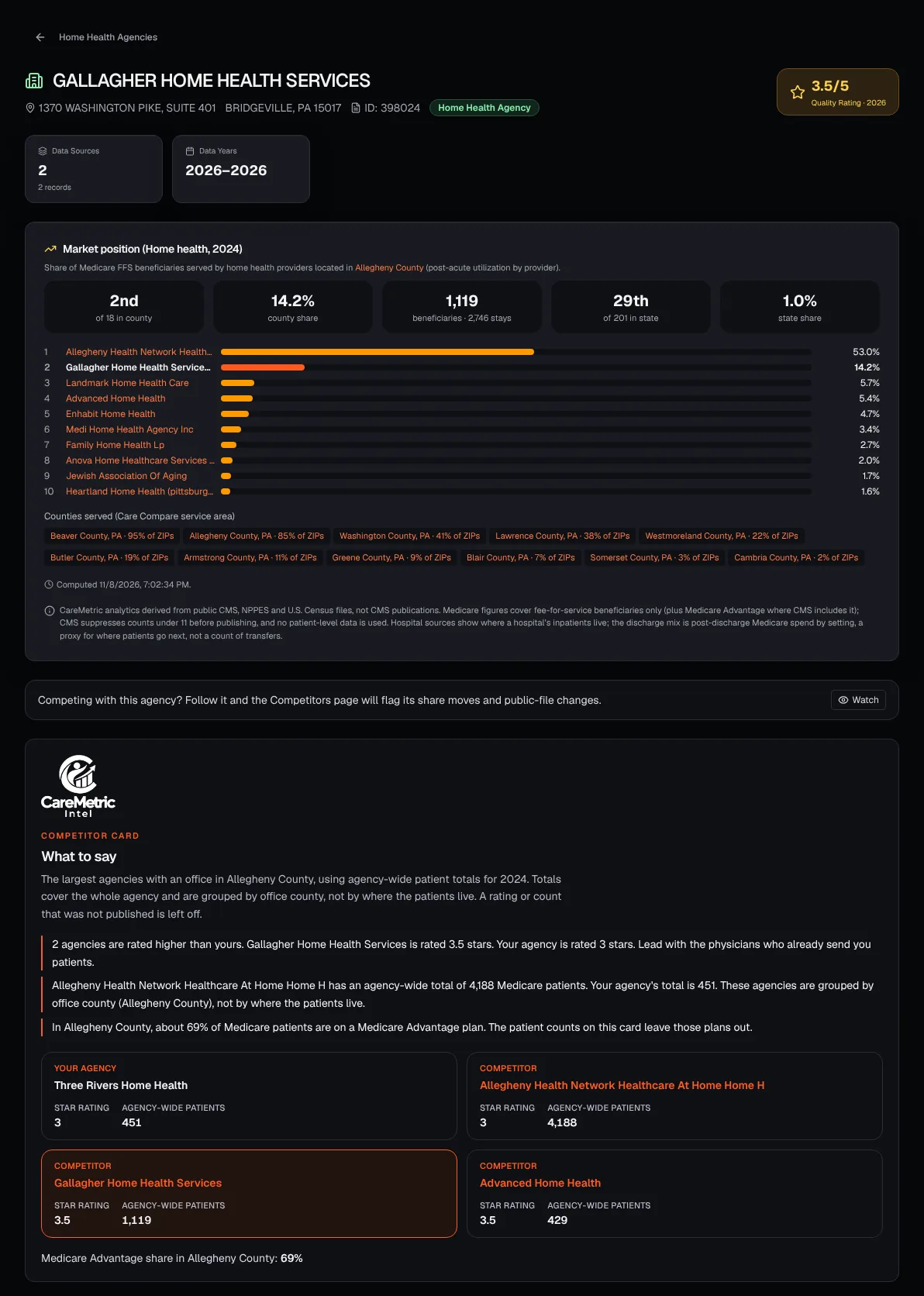
On a home health agency, hospice or nursing home, a card lines your organization up with the three largest in the county on star rating and Medicare patient totals (and patient survey for agencies), in plain sentences.
Personal care and assisted living ranking
For personal care and assisted living organizations: the state-licensed homes in your territory, largest first by licensed beds, with each one’s share of the licensed beds and yours marked. Download it as CSV.
Free county report
On the public site, anyone can choose a state and a county and get a PDF by email: the county at a glance, the hospitals its residents use most, and the nursing homes, home health agencies, hospices and personal care and assisted living homes located there. A sample report opens from the page.
Manager and team tools
Set expectations, see where the effort goes, and coach the people doing the work.
Goals and leaderboard
Monthly visit and referral targets for each marketer, a leaderboard, Met / On pace / Behind for the open month and a six-month trend. Everyone sees their own progress on Today.
Setting targets: Growth & Pro
Team review
One marketer’s week in one place: visits and calls with their notes, saved routes, open tasks and assigned accounts.
Owners & location managers
Activity report and weekly email
Visits, calls, tasks done and overdue, referrals and admissions by person and source, new and lost sources, stage changes and accounts not visited. Download a spreadsheet or PDF, or turn on a weekly email.
Weekly email: owners & location managers
Coaching
Ride-along notes, comments on a visit and 1-on-1s for one marketer.
Owners & location managers
Locations
Add locations and assign each person as a marketer or manager. People then see their locations’ accounts, and reports follow the same rule.
Owners · Growth: 3, Pro: 10
Book balance
Proposes a split of accounts across the marketers you choose by referral potential and drive time. Nothing moves until a manager applies it.
Pro · owners & location managers
Account briefs and Ask the book
A short factual brief on any account (stage, visits, calls and referral outcomes over 90 days, with notes left out), and answers to supported questions about your book, such as the top ten sources last quarter.
Decision briefs
Prioritized accounts to prepare for, manager exceptions such as overdue tasks and falling referrals, and changes on the accounts you watch. Download a branded PDF or CSV, or have it emailed.
Materials library
Brochures, physician one-pagers, service-line flyers and video links in one searchable place. New versions replace old ones, marketers note what they left on a visit, and managers see who opened each file.
Adding materials: owners & location managers
Healthcare observances
A calendar of the days, weeks and months that honor the people marketers call on (Doctors’ Day, Nurse Practitioner Week, Case Management Week, Social Work Month, Nurses Week and more), care settings, health awareness months and Medicare enrollment periods, worked out each year from the sponsor’s rule. Today and the Monday digest show what is coming up; Remind me adds a task two weeks ahead, and the calendar downloads for Outlook, Google Calendar or a phone.
Everyone, every plan
AI Assistant
Ask about your market, your book and your day in plain English. It looks answers up in the app’s data inside your plan’s territory, says when a figure is an estimate, and proposes lead lists, visits, tasks, call plans and outreach drafts that are saved only when you confirm. Each question uses one of your organization’s daily AI requests.
Growth & Pro · organization admins, and the team when turned on
AI playbook
An organization admin sets the pitch pillars, the service lines to mention and the words to avoid. The pre-visit card adds a pillar when it has room, and the notes summary and spoken debrief follow the playbook and flag an avoided word.
Setting it: owners
Use your own AI app with Intel
Make a personal token in Account and connect Claude, ChatGPT or any MCP app to Intel. It reads providers, lead scores, county and market facts, your day, account briefs, lead lists and your book as you, with your role and your plan’s places, and can’t change anything. Each question counts toward your organization’s AI requests.
Growth & Pro · whoever can open the AI Assistant
Activity challenges and report card
Set a friendly target for visits, calls, accounts touched or tier A visits for a location or the whole organization, with standings for everyone in it. Never referrals or admissions, with a reminder about contractors paid on a 1099. Each person's report card compares their month's activity with the month before.
Email campaigns
Reach the contacts on a lead list or your book, with sending rules that protect your reputation.
Campaigns to lists and contacts
Email a lead list, the contacts on one line of your book, or both. People marked as left are skipped.
Owners · Growth & Pro
Delivery tracking
Track deliveries, opens, clicks and bounces for each campaign, and link campaigns to the accounts they touched.
Owners · Growth & Pro
Sender and unsubscribe
Set the name recipients see, where replies go and your postal address. Every email carries an unsubscribe link that is honored automatically.
Owners · Growth & Pro
Queue contacts from an account
Any marketer can add a contact to a draft campaign from the account page; an owner prepares and sends it.
Growth & Pro
Nurture sequences
Start a sequence of calls, visits, emails and tasks on an account, from four starters (new physician welcome, in-service thank-you, quarterly outcomes packet, re-engage a slipping source) or your own. Email steps carry a draft you send from Follow-up. A sequence stops on its own on a referral, a contact leaving or every contact unsubscribing, or when you mark a reply.
Reports and analytics
Your book turned into reports that managers, owners and marketers can each trust for their own scope.
Reports library
Every report on one page, grouped by the question it answers: your organization, your competitors, new referral sources, your market, and the data builders. The list opens on the reports built for your kind of organization, and search finds a report by what it is about.
My organization
How your own providers stand in Medicare and state data. A home health agency, hospice, nursing home or hospital shows its CMS star ratings and published measures, how its rating compares with the others in its county, and its share, rank and trend there. A personal care or assisted living home shows its licensed beds and its share of the county’s. Home health agencies and hospices can download their own market report as a PDF.
How a hospital would score you
Your home health agency, hospice or nursing home against the county’s largest on the CMS measures hospitals weigh when they choose post-acute partners: a score out of 100 and its rank, what to work on first, and where you lead. Change how much each measure counts and the score follows. Pick a hospital on your book to see its referrals, the share you admitted and your response time beside it. CareMetric’s estimate, not any hospital’s score.
Results reports
Performance scorecard, field activity, tasks and follow-up, mileage, referrals and admissions, top referral sources, why referrals were not admitted, payer mix, source pipeline, account coverage and goal attainment.
Source quality after admission
Load a stays report (or have MatrixCare deliver it on a schedule) and see, by referral source, marketer or location, how long patients stay, short stays, hospice live discharges and revocations, home health returns to the hospital, and a nursing home's returns to the hospital and discharges home, plus average daily census against each location's budget. A group is rated only with 10 or more endings, a flag means 10 points above your own average, and patient columns are never read or stored.
Loading and organization budgets: owners · by marketer and location: managers
Filter and group
Choose dates, then filter and group by person, location, line of business, account type, county, payer, source type, month or week. Members see their own work; managers see their locations; owners see the company.
PDF, Excel and CSV
Every report downloads with the same figures as the screen and the source of the data printed on it.
Custom report builder
Save charts and email them on a schedule to up to 25 people in your organization.
Administration, security and data
Control who can see what, keep a record of it, and know where every figure comes from.
Organization, people and roles
Invite people up to your plan’s seats, make someone an owner or a member, disable accounts, send password reset links and sign someone out everywhere.
Owners
Text-message sign-in codes
Owners and location managers can add a six-digit code, sent by text, to their own sign-in.
Security audit
Sign-ins, account changes, exports and other recorded actions for your organization, with filters.
Owners
Billing and territory
Choose your plan, counties or states and add-ons (extra seats, locations and states) from Billing.
Owners
Guided setup and help
A guided setup for a new organization, an in-app help guide, and illustrated user guides for marketers and administrators as PDFs.
Business menu and search
Pick a healthcare service line to focus your CRM, referral tracking, and available research views. Use Other healthcare services for an unlisted specialty. Datasets and specialized reports vary by setting. Press Ctrl+K anywhere to search accounts, providers, NPIs, lead lists, pages and individual reports.
Data, clearly sourced
Provider, facility and market figures come from CMS, NPPES, the U.S. Census Bureau and state licensing files, with each dataset’s release shown. Market research uses no patient-level data.
Patient privacy by design
Patient-identifying columns are dropped from referral imports, briefs and scorecards leave notes out, and exports carry no patient names.
Send data out
An organization admin sends the organization’s own accounts, referrals and visit counts out every night: three CSV files to an SFTP server whose host key you pin, or accounts to HubSpot as companies. Notes, check-in positions and patient details never leave Intel; passwords and tokens are stored encrypted.
Setting it: owners
MAKE THE TRIAL USEFUL FROM DAY ONE
Try it on a market you know.
Bring a real territory question and leave with a working outreach plan. Your 30-day trial includes Pro features, one county, three marketer seats, and one manager seat.
Start your free trial30 days free · No credit card needed to start
- 01
Choose your county
Explore local providers, facilities, and the market data available in your territory.
- 02
Build your first account list
Pick the relationships to research, assign an owner, and plan the next visit.
- 03
Review the follow-through
Log activity and add your referral facts to see how the reporting works.
No credit card needed to start · Add a card before the trial ends to keep your plan. Choose healthcare service lines that fit your organization within your plan’s allowance. Research coverage varies by dataset and geography.
Ask a questionFeature availability, territory and usage limits vary by plan. Research coverage varies by dataset, geography and care setting. Market data signals support research and planning; they do not confirm referrals. Your organization’s results come from what your team records or imports. Patient-identifying columns are dropped from referral imports, and notes should never name a patient.